
1. Debug Architecture Overview
2. How to Enable ADB in Yocto (Step-by-step Guide)
2.1. Add ADB Package to Yocto Image
2.2. Configure and Enable adbd Service (systemd)
3. How to Enable SSH in Yocto and Configure Secure Port Forwarding
3.1. Add OpenSSH to Yocto Image
3.2. Enable and start SSH service
3.3. Configure SSH Key Authentication (Recommended for Production)
3.4. SSH Port Forwarding for Debugging Internal Services
4. ADB vs SSH in Yocto: Differences, Use Cases and Best Practices
5. Production Hardening Checklist for Yocto Devices (Security Best Pratices)
6. Conclusion: Secure and Efficient Remote Access in Yocto-Based Embedded Systems
1. Debug Architecture Overview

In embedded Linux environments, ADB (Android Debug Bridge) is commonly used during the development phase due to its fast shell access, convenient file pushing/pull functionality, and minimal security configuration requirements. This tool is particularly suitable for rapid debugging, log inspection, or direct system manipulation during firmware development.
For production and remote maintenance environments, SSH (Secure Shell) is a more optimal choice thanks to its secure encryption mechanism, key-based authentication support, and tight access control. SSH allows engineers to manage, update, and maintain devices remotely in a secure and stable manner.
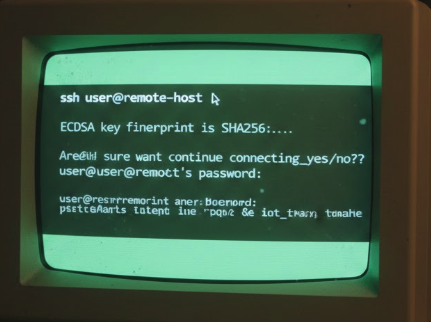
Furthermore, port forwarding allows access to internal services such as Web UI, REST API, MQTT, or gRPC running on the device without opening public ports to the Internet. This not only enhances system security but also facilitates debugging, testing, and monitoring of services during development.
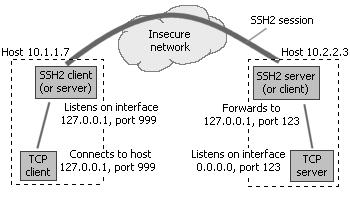
SSH Port Forwarding
2. How to Enable ADB in Yocto (Step-by-step Guide)
2.1 Add ADB Package to Yocto Image
To use ADB in Yocto, the image needs to contain adbd (ADB daemon) and the client tools. You can add the necessary packages to the image recipe or local.conf: IMAGE_INSTALL:append = “android-tools-adbd android-tools-adb”
If the build process reports a package not found error, check if the Android layer has been added to bblayers.conf, if the BSP supports android-tools, and if the recipe exists in meta-openembedded or the corresponding layer. After configuration is complete, rebuild the firmware using bitbake <your-image-name> and re-flash the board to apply the changes.
2.2 Configure and Enable adbd Service (systemd)
To have ADB run automatically after booting, you need to configure the systemd service for ADB. Create the file /etc/systemd/system/adbd.service with the following content:
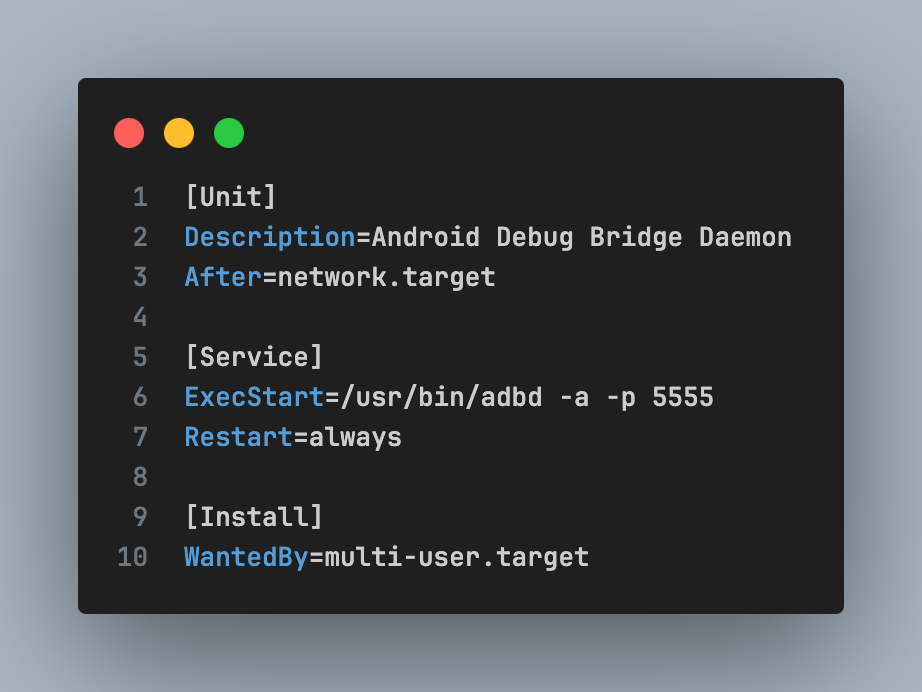
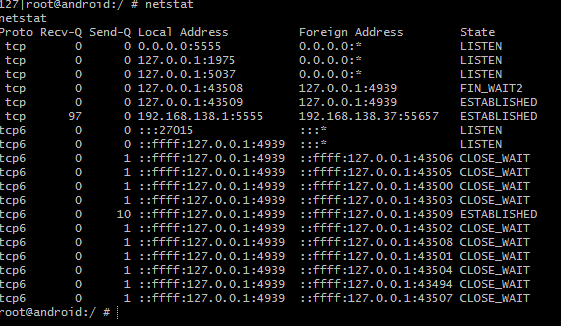
Then enable service, check daemon and port 5555:
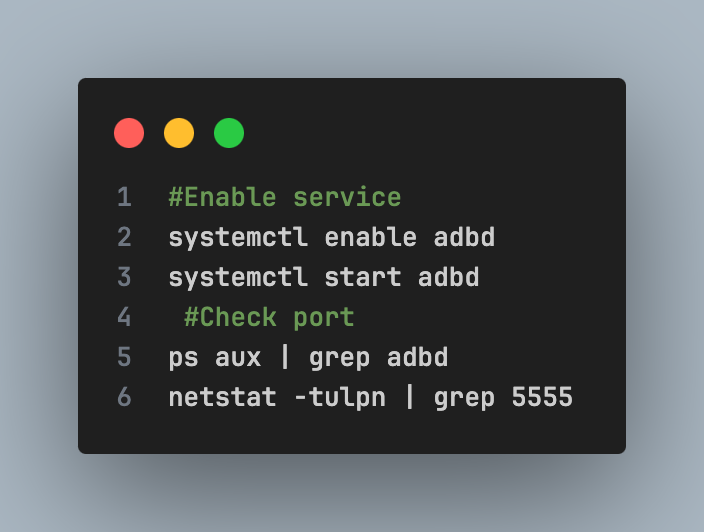
If port 5555 is LISTEN, ADB is ready for TCP/IP connection.
3. How to Enable SSH in Yocto and Configure Secure Port Forwarding
In embedded Linux environments, SSH (Secure Shell) is the standard remote access method for production systems. Compared to ADB, SSH offers strong encryption, key-based authentication, and integration capabilities into DevOps or CI/CD infrastructure.
3.1 Add OpenSSH to Yocto Image
In many Yocto minimal images, the SSH server is not installed by default to keep the system lightweight. To enable SSH, you need to add OpenSSH to the image recipe or local.conf by updating the IMAGE_INSTALL variable: IMAGE_INSTALL:append = “openssh openssh-sftp-server”
Openssh provides an SSH daemon (sshd) that allows remote shell access, while openssh-sftp-server supports secure file transfer via the SFTP protocol. After modifying the configuration, you need to rebuild the firmware using the bitbake command <your-image-name> and re-flash the device for the changes to take effect. Integrating SSH during the build phase ensures the system is ready for remote access during development or deployment.
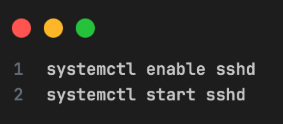
3.2 Enable and Start SSH Service
After the device boots into the system, you need to activate and start the SSH daemon. This can be done using systemd:
To confirm SSH is working, check the service status and network port:
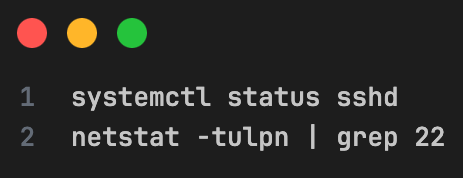
If port 22 is listening (listening), you can connect from your computer using the command:
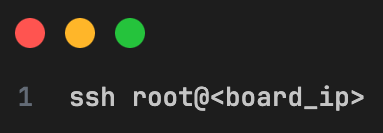
Confirm mode active:
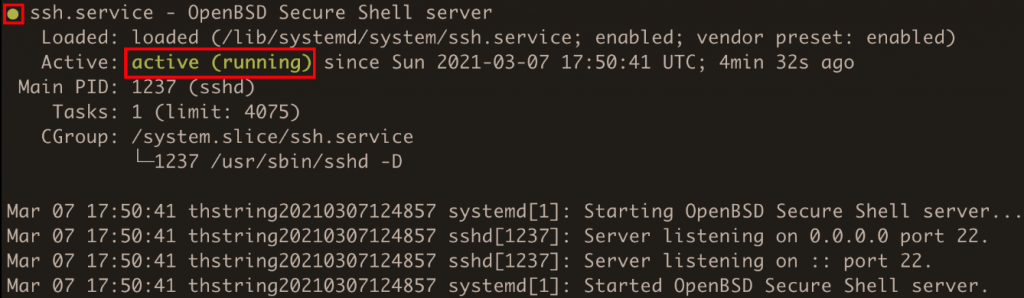
confirm service and port 22 active
3.3 Configure SSH Key Authentication (Recommended for Production)
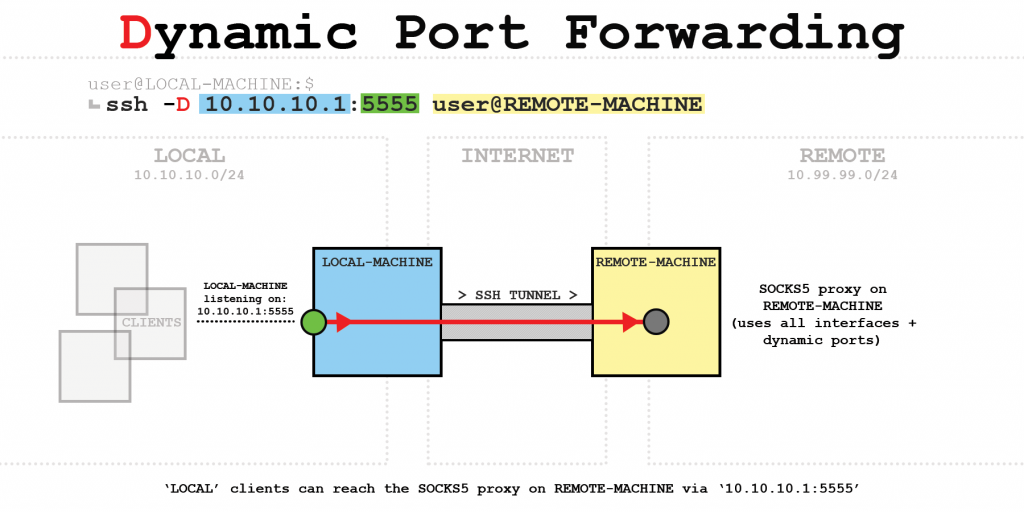
The principle of establishing a secure connection: The core mechanism of SSH is to create an encrypted “tunnel” (SSH2 session) through an insecure network environment. Data from applications (such as TCP clients) is sent to an internal port on the client machine, then encapsulated, encrypted, and transmitted to the SSH server for decryption before being sent to the final destination.
The primary SSH port forwarding methods provide two common port forwarding techniques for orchestrating data flow:
- Local Forwarding (-L): Allows clients to access services within the server’s internal network (such as a Web Server) by mapping the client’s port to the server’s port.
- Remote Forwarding (-R): Allows the server or external devices to access services running within the client’s internal network.
Dynamic Port Forwarding: Using the -D parameter, SSH can turn a remote server into a flexible SOCKS proxy. Instead of forwarding a fixed port, all traffic from client-side applications (such as browsers, curl commands) is routed through this single SSH tunnel to securely access the internet or other network resources.
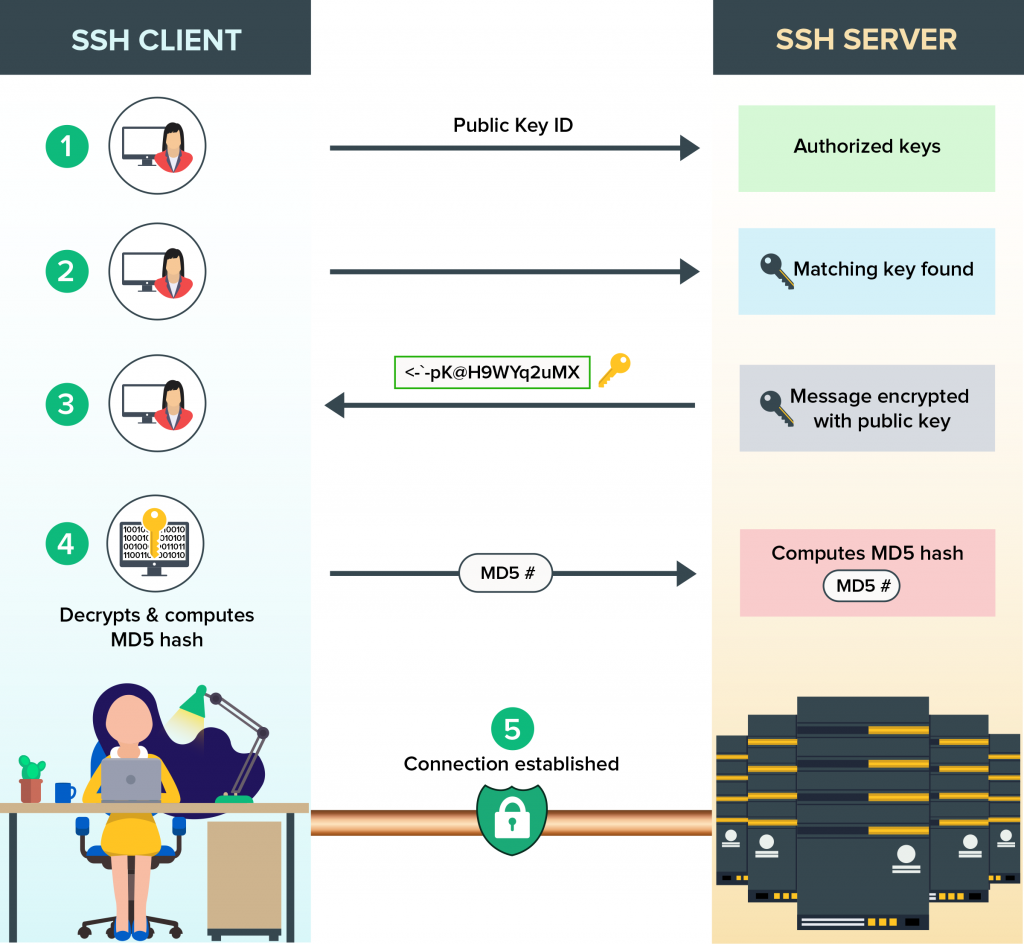
SSH Key-Based Authentication: To establish a secure connection without a password, SSH uses a public key and a private key pair. The process involves the client sending the public key ID, the server checking for the key’s existence in the authorization list, and then sending an encrypted challenge message. The client decrypts, calculates the hash, and sends it back to the server for confirmation before establishing the official connection.
3.4 SSH Port Forwarding for Debugging Internal Services
One of SSH’s most powerful features is port forwarding, which allows access to internal services without opening public ports.
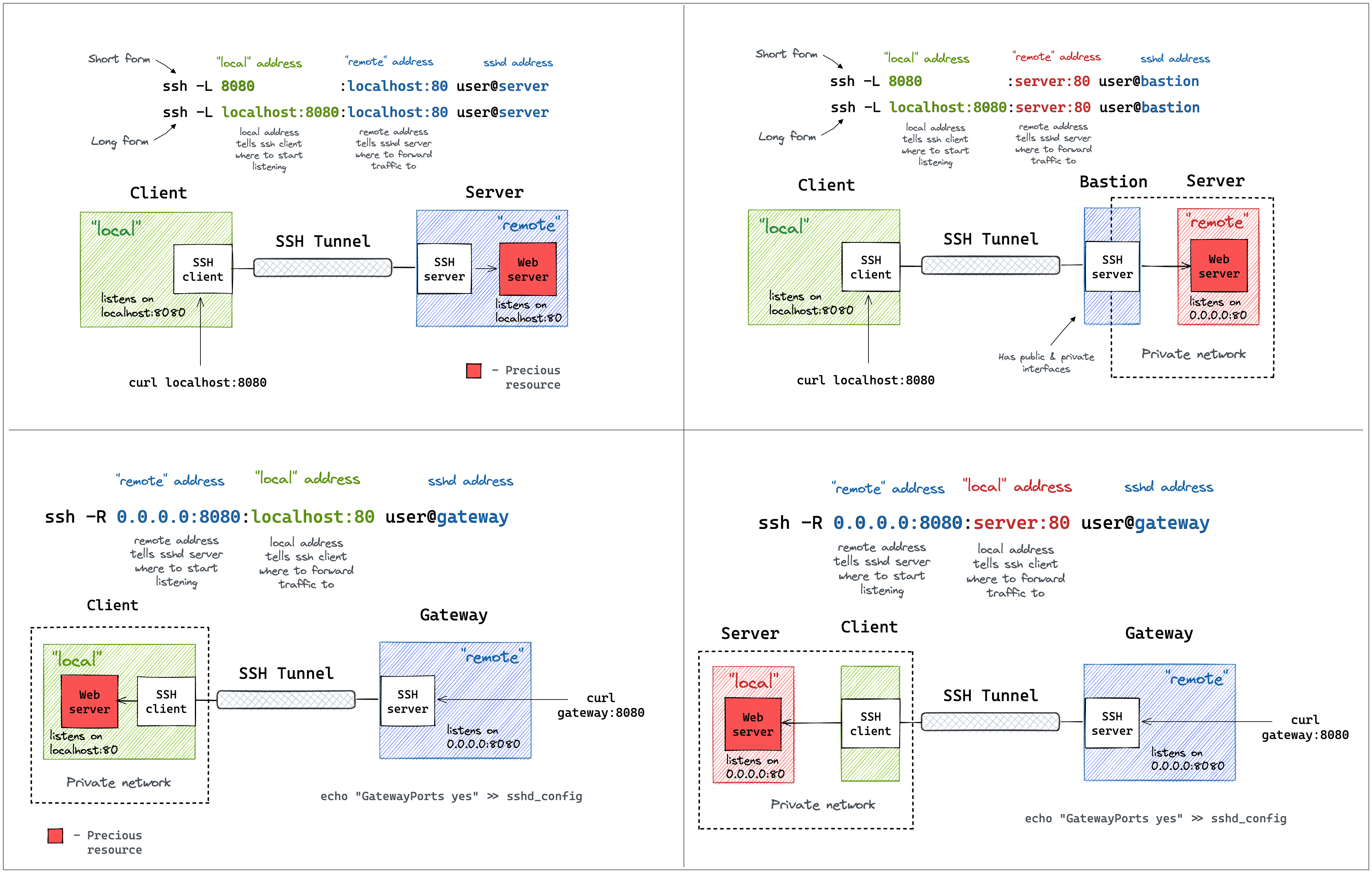
To meet the diverse connectivity needs within the system, SSH provides two main forwarding mechanisms: Local Port Forwarding (-L) and Remote Port Forwarding (-R). This diagram compares how data flows: from accessing an internal Web Server through an intermediary machine (Bastion), to publicly exposing a service from the internal network to the outside through a Gateway.
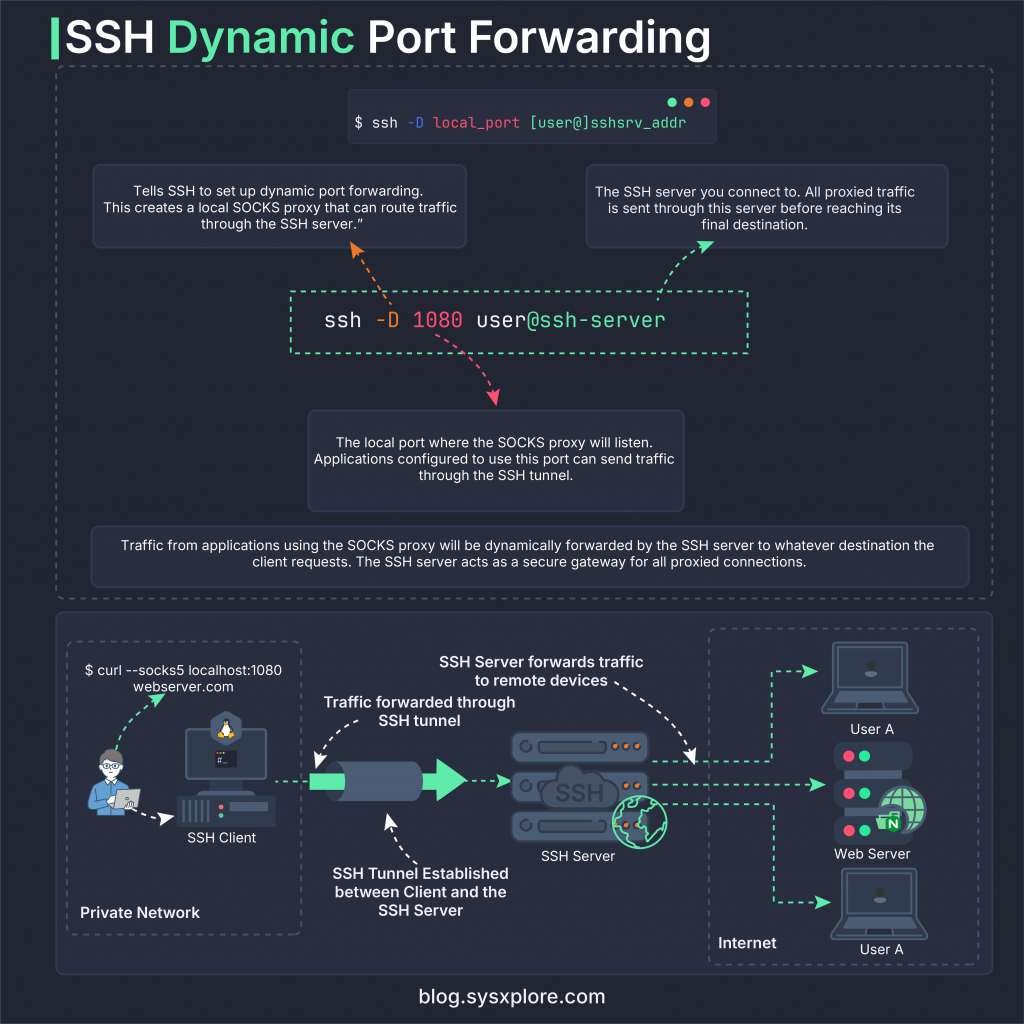
- Core Security Principle: In Yocto development, SSH Port Forwarding plays a crucial role in data protection. This technique creates an encrypted “tunnel” (SSH2 session) through insecure network environments, effectively preventing eavesdropping.
- Flexible Access Navigation: Depending on needs, we can use Local Forwarding (-L) to access the device’s internal services from the host machine, or Remote Forwarding (-R) to reverse the mapping. This method easily connects network components separated by firewalls.
- Optimized Dynamic Connection: With Dynamic Port Forwarding (-D), the SSH connection becomes a flexible SOCKS Proxy. It allows the simultaneous routing of data streams from multiple applications through a single port, optimizing resources and enhancing traffic management.
- Practical application for ADB and Yocto: Applying this mechanism to encapsulate ADB traffic allows for tight access control via SSH key. This ensures that all debugging and data transmission operations on the Yocto device are always performed within a reliable and fully encrypted channel.
4. ADB vs SSH in Yocto: Differences, Use Cases and Best Practices
When deploying Embedded Linux with Yocto Project, the choice between ADB (Android Debug Bridge) and SSH (Secure Shell) directly impacts security, performance, and production capabilities. Each tool serves a different purpose in the firmware development lifecycle.
Core Differences Between ADB and SSH
| Feature | ADB | SSH |
|---|---|---|
| Remote Shell | ✔ | ✔ |
| File Transfer | adb push / pull | scp / sftp |
| Port Forwarding | adb forward | ssh -L / -R / -D |
| Encryption | Limit | Strong encryption (AES, ChaCha20) |
| Authentication | Basic | Public key, certificate |
| Production Deployment | Not recommended | Standard production |
In summary: ADB is optimal for development speed, while SSH is optimal for security and long-term operation.
When to Use ADB in Yocto Development
ADB should be used primarily in the development, prototyping, and firmware debugging phases. This tool allows for quick shell access, direct file push/pull, and port forwarding without complex SSH configuration. In an R&D environment, ADB is particularly useful for log inspection, testing internal services, or quick device manipulation via USB or TCP/IP.
However, ADB (especially ADB over TCP/IP) does not provide the same robust authentication and access control mechanisms as SSH. Therefore, enabling ADB in production firmware can create serious security vulnerabilities. The best practice is to enable ADB only in the development image and remove it entirely from the production build.
When to Use SSH in Embedded Linux Production
In embedded Linux and Yocto production systems, SSH is the standard and mandatory access method to ensure system security. SSH provides end-to-end encrypted connections, supports public key authentication, user authorization, and the ability to restrict access by IP address or security policy. This helps IoT or industrial devices maintain security even when deployed in the field.
Beyond remote shell, SSH also supports secure port forwarding, automation via CI/CD pipelines, and integration with management tools like Ansible. For these reasons, SSH should be the primary remote access method in production firmware, while ADB should only exist in internal development environments.
5. Production Hardening Checklist for Yocto Devices (Security Best Practices)
When deploying Yocto devices to a production environment, enabling ADB and SSH must be accompanied by appropriate security configurations to reduce attack surfaces and ensure system security. Production firmware should be designed to be minimalist, retaining only the components truly necessary for operation and maintenance.
Disable ADB in Production: ADB should only be used during the development phase for debugging, log inspection, and firmware testing. In the production image, ADB should be completely removed from the build process, and ADB TCP ports should not be opened. Keeping ADB in the release firmware can create serious security vulnerabilities, especially when the device is networked. Best practice is to separate the development image and production image from the outset to tightly control remote access configurations.
Enforce SSH Key Authentication: In the production system, SSH should be configured with key-based authentication instead of password login. This helps prevent brute-force attacks and reduces the risk of authentication information leakage. In the /etc/ssh/sshd_config file, disable PasswordAuthentication, restrict PermitRootLogin, and ensure PubkeyAuthentication is enabled. Using SSH keys enhances security when the device is operating in the field or in an industrial environment.
Restrict Network Access: Production firmware should only open ports that are truly necessary, typically port 22 for SSH. Non-essential services should be disabled or not exposed to the network. Additionally, firewall rules should be applied to limit IP access or require connections via an internal VPN. Controlling network exposure is a crucial layer of protection in the security architecture of an Embedded Linux system.
Apply the Least Privilege Principle: Do not use root for all maintenance or operation. Instead, create a separate user for maintenance and grant limited sudo privileges according to usage needs. Applying the least privilege principle minimizes damage if an account is compromised and increases control over system access.
Development vs Production Configuration
The distinction between development and production images needs to be clearly defined during the firmware build process. Development images can enable ADB, allow SSH password login, and integrate debugging tools to support R&D. Conversely, production images must remove ADB, mandate SSH key usage, restrict root login, and remove all debug services to ensure the highest level of security before actual deployment.
| Component | Development | Production |
|---|---|---|
| ADB | Enabled | Disabled |
| SSH Password | Allowed | Disabled |
| SSH Key | Optional | Mandatory |
| Root Login | Allowed | Restricted |
| Debug Tools | Enabled | Removed |
6. Conclusion: Secure and Efficient Remote Access in Yocto-Based Embedded Systems
Enabling ADB and SSH in Yocto is not simply about configuring remote access; it directly impacts the development process, system security, and long-term operational capability of embedded Linux devices.
During the development phase, ADB speeds up debugging, facilitates file manipulation, and makes testing internal services easier. However, when transitioning to a production environment, SSH becomes a mandatory standard due to its strong encryption mechanism, public key authentication, and tight access control.
To build a secure and professional Yocto system, you should:
- Separate development image and production image.
- Disable ADB in the release firmware.
- Implement SSH key-based authentication.
- Limit firewall and user access.
- Perform system hardening before actual deployment.
Key Takeaways
- ADB is suitable for development and R&D.
- SSH is a secure remote access solution for production.
- Port forwarding helps debug internal services without opening public ports.
- Hardening is a mandatory step before releasing firmware.
Final Thoughts
In IoT projects, Industrial Linux, or commercial devices using Yocto, designing the right remote access architecture from the start will help:
- Reduce security risks
- Easier maintainer and firmware updater
- Optimize product development workflows
By combining ADB for development and SSH for production, you can build a flexible and secure embedded Linux system.